

Instructional design is evolving – your toolkit should, too.
By Bianca Schimizzi
Director & Lead Instructional Designer | Hungry Minds
In learning design, the tools shape the work. They define what’s possible, what gets built, tested, adapted, and scaled. But the sheer number of options on the market is enough to cause real decision paralysis.
This instructional design toolkit cuts through the noise. It covers the tools, frameworks, AI picks, and templates that keep learning tied to real business outcomes. With nearly 20 years building programs that last, here are the tools and templates we trust enough to use ourselves.
In this guide:
- What instructional designers are using in 2026
- Frameworks that structure design without killing creativity
- How experienced learning designers choose tools
- Instructional design in practice: real-world combinations
- AI tools for instructional design: useful, not a magic bullet
- The cost of tool overload, and how to stay lean
- How to build a smarter instructional design toolkit

Instructional design tools: what practitioners are using in 2026
Decision paralysis is real when it comes to choosing instructional design tools. This overview is built to help you assess and shortlist tools that suit your next project, fast.*
| Tool | Best for | Strengths | Watch out for | Price range |
|---|---|---|---|---|
| Storyline 360 | Scalable, interactive eLearning | Versatile, mobile-ready, widely supported | Pricey for small teams, requires design skills | $$$ |
| Rise 360 | Mobile-first, bite-sized learning | Quick to launch, easy for teams without deep design skills | Limited customisation for more complex courses | $$ |
| Miro | Visual – keeps messy ideas moving | Intuitive, great for early-stage mapping | Can get chaotic for larger teams | $ |
| Figma | Mapping learning with sharp design control | Realistic prototypes that show the real user journey | Design background needed for best results | $$ |
| TalentLMS | A lightweight LMS without the IT headache | Fast set-up, mobile friendly, supported | Basic UX – not ideal for complex ecosystems | $$ |
| LearnUpon | Scaling programs without losing quality | Flexible setup, good learner experience, good analytics | Premium pricing, you may need implementation support | $$$ |
| LearnWorlds | Building and selling interactive online courses | Customisable, built-in sales tools, mobile-friendly | Can get pricey with add-ons, learning curve for setup | $$-$$$ |
| Claude | Brainstorming and drafting | Speeds up first drafts, broad knowledge | Needs strong review – risk of generic content | $ |
| Synthesia | In-house training videos (no studio or crew) | Fast video creation without a green screen | Edit carefully – can feel flat | $$ |
| Power BI | Making data into business-friendly dashboards | Clear reporting, works well with most learning systems | Prep matters – bad data in = bad data out | $$$ |
*Affiliate disclosure: Hungry Minds earns a small commission from TalentLMS and LearnWorlds recommendations. Our assessments remain independent.
As you can see, learning tech is a moveable feast – but it’s up to you to decide what to put on your plate. Most importantly, you need to choose tools that fit the way you design, deliver, and scale learning. If you don’t know your collab platforms from your rapid authoring tools, here’s how to think about the different flavours on offer.
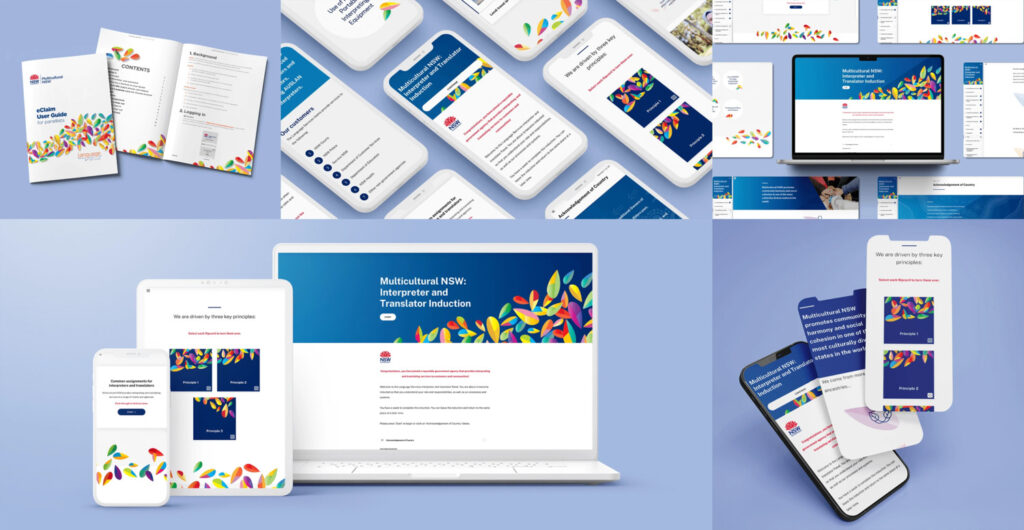
Multicultural NSW’s eLearning program, designed in Rise 360.
Instructional design frameworks that structure learning without killing creativity
Instructional design frameworks tend to get a bad reputation. People assume they mean rigid rules and cookie-cutter templates.
In practice, a good framework gives you exactly what you need, structure, without shutting down creativity. It keeps projects moving and makes sure the learning delivers for the business.
After nearly two decades of designing learning programs, here’s how we use frameworks to build better, faster, and smarter:

Journey maps
Imagine a map that shows where a learner starts and all the cool places they’ll visit – not just one lesson, but the whole adventure. It helps us plan the trip so nobody gets lost, bored, or stuck. Journey maps help us design learning that builds skills over time, not just in isolated bursts.

Evaluation scorecards
Scorecards give us a structured way to measure learning impact — not just who completed a course, but what changed because of it. A clear way to link learning outcomes directly to business goals, turning training from a nice-to-have into a clear ROI.

Scenario-based learning frameworks
Pulls learners into real-world situations where they have to make decisions, solve problems, and see the consequences of their choices. Frameworks help us design these experiences consistently, so every situation feels real, relevant, and rooted in the skills people need on the job.

Storyboards
A visual, step-by-step outline of what the learning will look like and feel like. Storyboarding speeds up collaboration: clients can review and give early feedback, and teams find it easier to stay aligned.
When it comes to frameworks, ADDIE is our ride-or-die. It’s a proven process – and the basis of our learning design approach. Following this framework keeps projects on track, reduces rework, and gives creative teams the freedom to innovate inside a smart, proven structure.

Analyse — the appetiser
Identify key learning priorities to deliver everything you need—and nothing you don’t. No filler, no fluff.

Design — the recipe
Clarify scope, resources, and learning strategies with decision makers up front. No surprises in your kitchen!

Develop — made to order
We build engaging, interactive learning experiences—aligned to your goals. Co-designed, iterated and perfected.

Implement — presentation
Prepare the client for a seamless roll-out in F2F, virtual, or blended environments. Get pilot-ready and go for launch.

Evaluate — taste + tweak
Review against learning outcomes — find out what to start, stop, and keep. Identify changes for lasting impact.
Frameworks aren’t there to hem us in, they’re structural guidelines. When creativity has a smart structure to work inside, teams move faster, collaborate better, and build learning that actually sticks. That’s true whether you’re using ADDIE, a scenario-based framework, or a custom instructional design template.
How experienced instructional designers choose the right tools
Once you’ve hammered out your learning strategy, you might think it’s time to talk to someone in IT about learning programs. But I cannot overstate this: choosing learning tech isn’t about grabbing whatever’s on hand (or cheap). This is a strategic choice. And you need to find something that fits the organisation, the learners, and what you’re working towards.
But smart frameworks are just one part of the puzzle. The best learning designers also know how to choose the right tools – and what to leave behind.
Here’s the decision filter ID pros use when they choose tools:
Here’s the decision filter ID pros use when they choose tools
First, zoom out. Great learning is a strategic lever (and it doesn’t happen in a vacuum). That means any tool you use needs to tie back to bigger organisational goals. If you haven’t linked your learning programs to your strategic plan – step away from the authoring platform! Before you do anything else, get thee to our guide: Build a learning strategy that shapes culture and drives performance.
How to spot business aligned tools:
- Ask: How will this tool support our business strategy?
- Ask: I’d like to see a real world example of the tool helping a business hit strategic targets – may I see a case study?
There’s nothing more frustrating than being called away from your work for a dumbed-down (or impossibly blue-sky) training session that doesn’t serve you. Choosing the right tools means understanding:
- What learners need to know
- How they learn best
- What makes them tick
If your learners are on the move, a laptop-only course is a brick in their backpack. Mobile-first learning? That’s just good manners. Bottom line, it’s all about context. Learning should be seamless, not an annoying inconvenience.
How to spot learner-friendly tools:
- Always, always test the learner experience on a phone
- Ask: Can learners with different needs use it easily?
Unless you’re chiselling your business plan into stone tablets, I’m going to assume growth is part of your strategic goals. So you need learning tech that scales. Can the LMS handle twice as many users? Will your authoring tool let you make easy content updates that shift with your business needs?
How to spot a scalable tool:
- Ask: What’s the user cap? Can we easily add more learners, teams, or languages?
- Ask: Can we update modules or swap out learning assets without rebuilding?
- Ask: What steps is the platform taking to future-proof the tech?
Professional learning doesn’t happen on an island. It’s part of an ecosystem within your organisation. From one instructional design pro to another: if learning tech doesn’t play well with IT’s stack, you’re in for a long, painful battle. And learning will lose. Remember, the best tech choices are the ones that integrate smoothly, without a battalion of nerds stitching systems together behind the scenes.
How to spot a good playmate:
- Find out if the tool includes out-of-the-box connectors to HR, CRM, and analytics systems
- Can the vendor show you working integrations with the platforms you already use?
- Do they dodge questions about integration timelines? If so – red flag!
It’s easy to track course completions. But you want to know what learners did differently after the course. Choose a tool that delivers real data on behaviour change, skills application, and business outcomes. That’s how to show whether learning is moving the needle.
How to get the tea:
- Ask: What behavioural data can you pull? How do you measure skill gains?
- If the dashboard looks like a labyrinth, it probably won’t work for your execs
- Ask about custom reporting – if you’re limited to canned reports, move on
Instructional design in practice: turning capable managers into confident leaders at South32
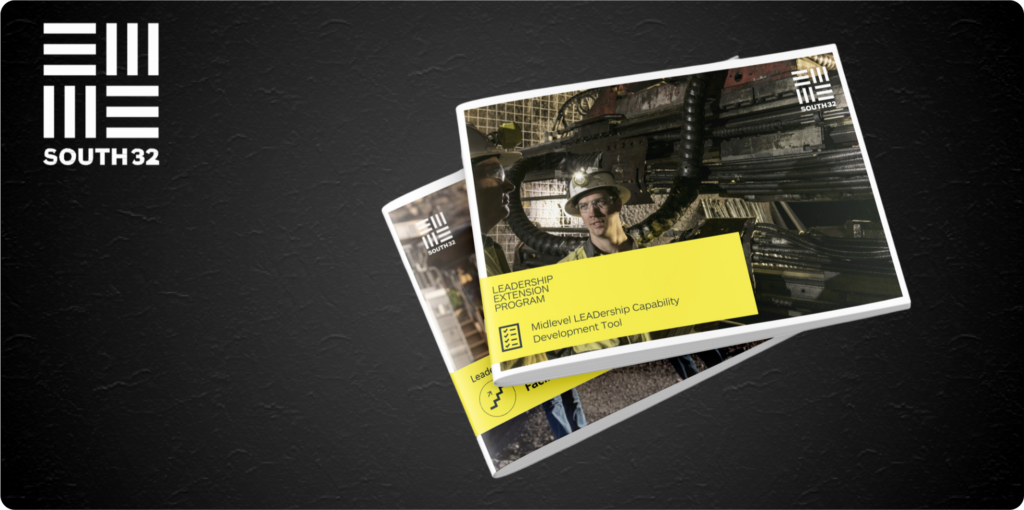
South32 is a globally diversified mining and metals company. Their mid-level leaders were technically strong and operationally sharp. South32 needed a program that would help mid-level leaders lead people – not just projects.
We partnered with South32 to co-design a blended learning journey: a series of flagship workshops, virtual social learning circles, and guided coaching conversations – supported by custom activity cards, facilitator guides, and a learning journal for on-the-job growth. Every element was tailored to their real-world context and designed for scale.
The result?
A leadership ecosystem that meets leaders where they are. It helped South32 leaders change behaviours, develop connections, and develop a new mindset. The feedback was so strong, they’re now planning to expand the program across regions – bringing the same practical, people-first leadership approach to mid-level leaders around the world.
Read the case study: How Hungry Minds helped South32 turn capable managers into confident, connected leaders
AI tools for instructional design: useful, but not a magic bullet
AI tools for instructional design have earned their place. They’re strong for drafting outlines, generating quiz banks, and sketching early scenario structures. Tools like ChatGPT and Claude can handle the first-pass grunt work, freeing up design teams to focus on what matters: decisions, nuance, and learning that actually changes behaviour.
But speed isn’t everything. And AI consistently misses what matters most: nuance, context, and understanding. It certainly won’t notice when the brief has shifted or when learners stop caring.
Used well, AI can help clear the first draft fog. It helps teams spend less time staring at a blank screen and more time designing for impact. But the outcomes that matter still need a human hand.
AI traps even good designers fall into
Let’s be honest about what happens when IDs lean too heavily on AI. It isn’t just that they create mediocre courses. Not only that, it’s easy for bias to creep in, which is a huge compliance risk. Over time, those courses start to erode trust – undermining learning itself in the organisation.
By all means, use AI as a tool – but be aware of these common pitfalls:
What to do instead
- Pair AI use with expert review. Look for missed nuance, bias, cultural fit, and context.
- Use AI for drafts, but leave real learning design – the flow, friction, and connection – to humans.
- Look for real engagement signals: time on task, decision-making patterns and knowledge transfer.
The cost of tool overload and how to keep your instructional design toolkit lean
You’re familiar with the phrase ‘too many cooks spoil the broth’ – the same is true of instructional design tools. It can be tempting to get your hands on the latest and greatest of everything, but having too many tools can put you in hot water, too.
Business cost: Lost productivity: Learners spend more time navigating tech than building skills. Missed insights: Skill gaps stay hidden behind broken reporting. Slower time to competency: Learners flounder longer before they perform.
Business cost: Sunk costs: budgets sunk into shelfware instead of outcomes. Credibility hit: Nothing says ‘we don’t know what we’re doing’ like a cobbled-together tech stack.
Business cost: Lower engagement: Disconnected learners complete fewer programs and retain less. Behavioural inertia: No behaviour shift, no outcomes lift. Bye, Felicia: Disconnected people may disconnect from the organisation for good.
How we fix tool overload
At Hungry Minds, we don’t collect tech trophies. We build ecosystems that work – and keep working. Here’s how we frame our tech stacks:
How to build an instructional design toolkit that actually works
Strategy first
Define what behaviour, capability, or outcome the business is trying to shift before picking up a single license. If a tool can’t tie back to a strategic lever, it doesn’t get a seat at the table.
Identify learner needs and realities
Design for where, when, and how people learn. Anything else is just noise.
Map the tech stack early
Sketch the full ecosystem first: HRIS, CRM, LMS, LRS. Know where your tools fit (and where they don’t). If you leave integration to the end, you’ve already lost.
Pilot before scaling
Big rollouts = big mistakes. Start small. Stress-test the experience with real learners in real conditions. Iterate, then scale.
Build measurement in from day one
Choose tools that can prove they work. That means they don’t just track completions – they show what changed. If you can’t measure the behaviour shift, you’re not managing it.
Learning toolkits that get the job done
A good instructional design toolkit doesn’t start with tech. It starts with knowing what moves the needle — and building from there. That’s why our learning design and eLearning teams create hardworking learning ecosystems. You’ll get the right tools, connected to the right strategies, made for your people doing what matters to your organisation.
Ditch that bloated tech stack and get serious about learning that moves your organisation forward. Learn more about learning design and eLearning or book a call with Michael to get started.
FAQs – frequently asked questions
Instructional design is the craft of creating educational programs that make learning efficient, effective and appealing. It’s a blend of art and science, where we analyse learners’ needs, design a structured learning path, and use strategies that enhance understanding and retention. Essentially, it’s the behind-the-scenes work that ensures the learning experience is impactful.
Instructional design covers everything involved in creating effective, engaging learning experiences. That includes:
- Needs analysis: understanding what learners need to know and why
- Learning objectives: defining clear, measurable outcomes
- Content design and development: crafting learning materials (digital, print, video, etc.)
- Structure and sequencing: organising content in a logical, impactful flow
- Learning activities: designing interactive, practical ways to apply knowledge
- Assessment design: creating ways to check understanding (quizzes, scenarios, projects)
- Technology integration: choosing the right tools to support the learning
- Evaluation: measuring how well the learning worked and where to improve
ADDIE is the go-to model for instructional designers – and for good reason. It’s flexible, practical, and helps create learning that actually sticks. At Hungry Minds, we use our own take on the ADDIE framework to guide every project:
- Analyse: What are the business goals? What do learners need? What’s already working (or not)?
- Design: Structure the learning journey, sequence the content, map the experience
- Develop: Build the assets – slides, videos, toolkits, workbooks, platforms, the lot
- Implement: Time to launch. We help roll things out smoothly and support you along the way
- Evaluate: What changed? What landed? We capture feedback and measure impact
Instructional designers commonly use AI tools to accelerate content development rather than replace design thinking. The most widely used include ChatGPT and Claude for brainstorming and drafting outlines, quiz questions, and scenario prompts; Synthesia for producing training videos without a studio; and tools built into authoring platforms like Articulate 360. The key is using AI for first-draft speed while keeping a human designer across nuance, context, and learning flow.
An instructional design toolkit is the combination of tools, frameworks, templates, and processes an instructional designer uses to plan, design, develop, and evaluate learning programs. A well-built toolkit typically includes an authoring tool (such as Storyline 360, Rise 360 or Chameleon Creator), a learning management system such as LearnWorlds, design and collaboration tools, evaluation frameworks, and content templates like storyboards and journey maps.