

Key takeaways
- Rise 360 can now adapt on its own. Skip Ahead Quizzes let a learner prove what they know and jump the content they do not need, with the skipped lessons marked complete.
- Code Blocks let us build a custom interaction inside a Rise course. An instructional designer can describe one and have a working prototype the same day.
- AI Tutor, in public beta, answers a learner’s questions inside the course, so one course serves a new starter and a twenty-year veteran.
- A tutor grounded in your own SharePoint content answers from the current procedure instead of a copy that went stale inside a course.
- Three things decide whether it is safe: where your content goes, whose permissions the answers respect, and whether it works on a keyboard.
A compliance module is usually built for the person who knows the least, and then everybody sits through it. The experienced operator clicks next for twenty-five minutes to reach a quiz they could have passed on day one. The new starter gets the same explanation whether it lands or not.
That is the problem adaptive learning solves, and Rise 360 can now do a fair amount of it out of the box. This article covers what is possible today, what it takes to build, and what to settle before any of it reaches your people.
What Rise can do today
Product features move quickly, so these were confirmed on 10 September 2026 and are worth re-checking before you plan around them.
- Skip Ahead Quizzes, released in Articulate’s Q2 2026 update. A learner takes a pre-test, and passing sends them to a lesson you nominate with the skipped content marked complete.
- AI Tutor, in public beta. It is a course-aware chatbot the learner opens inside the course to ask questions and get explanations.
- Code Blocks, which let an author drop HTML, CSS and JavaScript into a lesson. Articulate has confirmed that AI Tutor reads the text inside them.
Start with what Rise already gives you
Before anybody writes code, take one short course and put a five-question diagnostic at the front of it.
Write those questions to test application instead of recall. Somebody who can quote the policy and still handle the conversation badly has not earned a skip. Open it the way you would open it in a room. You are about to do Managing Difficult Conversations, and if you already know your stuff, show us.
A learner who passes goes straight to the scenario or the final practice activity, and everybody else works through the content first. You get one course with two journeys, instead of a beginner version and an experienced version to keep in step.
Then measure it. Compare the standard course, where everybody spends twenty-five minutes, against the adaptive one where experienced learners might spend eight to ten. Look at completion, assessment performance and what people say afterwards. The question is not whether the adaptive feature worked. It is whether you removed learning nobody needed without reducing what your people can do.
Build a custom interaction, without a software project
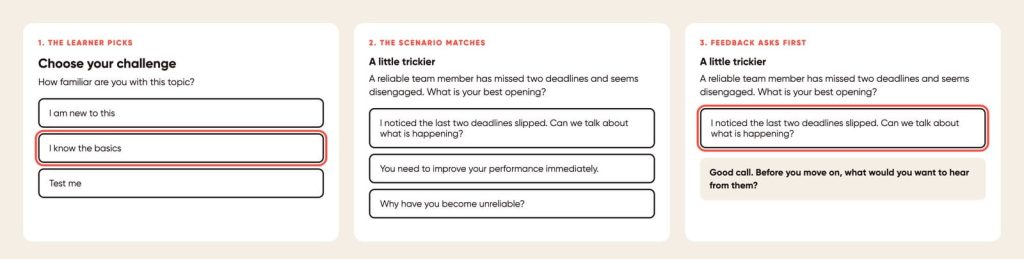
Code Blocks turn a Rise lesson into a small playground, and using one no longer requires a developer. An instructional designer can describe the interaction, have Claude or ChatGPT write it, then test whether the learning logic holds and refine it.
The prompt that produces something usable is specific about the learning, not the code:
Create one self-contained HTML, CSS and JavaScript interaction for an Articulate Rise Code Block. The learner is practising a difficult conversation with an employee. First ask how confident they are: new to this, some experience, or very confident. Then present a workplace scenario and change its difficulty to match the answer. Give feedback after each decision, and ask one reflective question before revealing anything. Use accessible buttons, keyboard support, visible focus states and plain English. Load no external libraries.
That pattern covers a lot of ground:
- a scenario that gets harder each time the learner succeeds
- a practice activity that offers a hint after a wrong answer
- a diagnostic that recommends which lesson to take next
- a choose-your-challenge activity with three levels
- a worked example that removes its scaffolding step by step
- a case study where the consequences follow the learner’s decisions
Here is the heart of one, and the whole thing runs to about ninety lines:
var scenarios = {

new: {

title: "Start with the basics",

text: "A team member has missed two deadlines. What do you do first?",

answers: [

["Ask what is getting in the way", true],

["Tell them the behaviour is unacceptable", false]

]

},

confident: {

title: "Right. Let us make you work for it.",

text: "Your high performer is missing deadlines. They say the " +

"workload is the problem, and colleagues say they keep " +

"taking on work outside the agreed priorities.",

answers: [

["Workload, priorities, and how new work is accepted", true],

["A formal performance warning", false]

]

}

};
Two limits are worth knowing before you commission one. A custom block adapts what happens inside itself. The JavaScript in it should not be trusted to drive the rest of the course, your LMS or completion. Rise also does not make an embedded interaction accessible on import. Keyboard operation, focus states and screen reader support are built in deliberately, or they are absent.
Let learners ask
AI Tutor adapts in a different way. The course stays as it is, and the explanation changes because the learner asks for it in their own words.
People ask things like “I still do not understand this”, “give me another example” and “explain it like I am new to the role”. Answering those well normally means writing three versions of every explanation. The tutor does it on demand.
There is a useful wrinkle. Because AI Tutor reads text inside a code block, a course can carry two layers. The learner-facing summary sits on the page, and approved detail behind it helps the tutor answer a harder question.
It also has a maintenance cost, and that cost is the argument for the next section. Copying a policy out of SharePoint and into a course creates a second copy. When the policy changes, the course does not know.
When the answer has to come from your source of truth
A learner asks what to do when a contractor reports a safety incident. The useful version of this does not answer from general internet knowledge. It searches your approved content, finds the current procedure, answers from that, and shows the source. When your team updates the procedure, the answer updates with it.
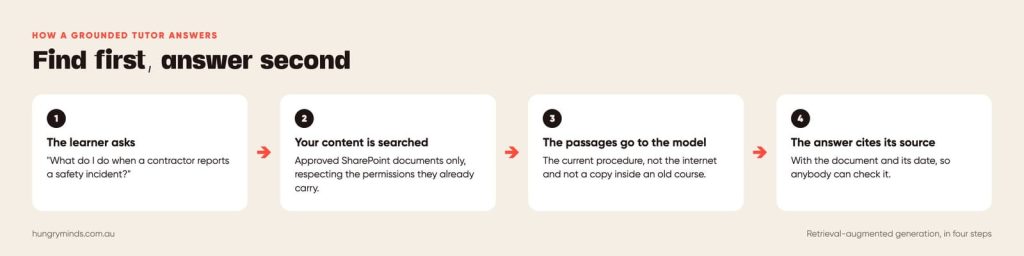
Four pieces make that work. The learner sees a chat window. The question goes to a secure AI service. Before answering, the service searches your approved knowledge. The model then answers from the passages it was handed.
The industry calls it retrieval-augmented generation. The part that matters is the order: find first, answer second.
Microsoft already treats SharePoint as an enterprise knowledge source across several of its AI products. That is a shortcut for any organisation living in Microsoft 365. Copilot Studio can use SharePoint and OneDrive files as knowledge, and it now supports SharePoint Lists directly. The Microsoft Learning Agent can treat nominated SharePoint sites as authoritative, while respecting the permissions those sites already carry.
That leaves two paths, and they answer different questions.
| Configure it in Microsoft | Build it as a learning experience | |
|---|---|---|
| Best for | Organisations already deep in Microsoft 365 | Teams who want a tutor that teaches, not a search box |
| Effort | Configuration, days | Design and engineering, weeks |
| Control of the experience | Whatever the platform allows | Yours, down to the wording |
| Permissions | Inherits SharePoint permissions | Built and tested deliberately |
| Where it lives | Microsoft surfaces, plus links | Any course, intranet or page you can embed |
| Start here when | You want to know whether grounded answers help at all | The tutor has to teach, not just retrieve |
The first path is the honest first test. The second is where the learning design earns its keep.
Make it behave like an instructional designer
Connecting a model to a folder gives you a better search box. What turns it into learning is the set of rules it follows.
- Answer from approved sources only, and say so when they do not cover it.
- Show the source document, with its version or date.
- Never invent organisational policy.
- Give the direct answer first, then offer an example.
- Ask a reflective question when somebody is practising judgement, not looking something up.
- Generate a short scenario when somebody wants to practise.
- Pitch the explanation differently for a novice and an experienced hand.
- Keep away from assessment answers.
- Send high-risk or ambiguous situations to a named human.
It also needs to know when to get out of the way. Somebody who says “just tell me what the policy says” gets the answer first. Then comes the offer: the thirty-second version, the step-by-step, or a scenario.
Three things to settle before it goes live
Where your content goes. A tutor grounded in your content sends that content to an AI service. Establish which service, where it runs and what it retains. Confirm your information security team has approved it, and find out what happens to a learner’s questions. Settle it in writing before the pilot.
Whose permissions the answers respect. Grounded answers have to respect who is allowed to see what. Test with a low-permission account and try to make the tutor say something that account should not hear.
Whether it works for everyone. WCAG 2.2 AA applies to a chat window and to every custom block. Keyboard operation, focus order, announced updates and colour contrast are all built deliberately, and none of them arrive by importing something into Rise.
What we would build first
We would not point a model at your whole SharePoint on day one. Pick one contained topic and five to ten approved documents. Then build two small things: an adaptive interaction inside one Rise lesson, and a tutor that answers from those documents and cites them.
Then try to break them. Ask the questions it should answer and the ones it should refuse. Change a source document and check the answer changes. Try vague questions, bad spelling and two documents that contradict each other. Try it on a phone, with a keyboard only, and with a screen reader. Then ask the hardest question of all: what does it do when the answer is not in the sources?
Where this sits in a build
Skip Ahead Quizzes are a design decision inside a standard eLearning build, not an extra. One custom interaction in a Code Block adds a small amount of scope, and we quote it before we start. A grounded tutor is a separate build with its own discovery. The work sits in the content, the permissions and the rules, not in the chat window.
Talk to us about your next module
Send us the course everybody sits through and the audience who already knows it. We will tell you what would adapt, what it would take, and whether the money does more good somewhere else.
Try our demos, then book a call to talk about your own.
Frequently asked questions
Sources
All read on 10 September 2026.
- Articulate, “What’s new in Articulate 360: Q2 2026”. Skip Ahead Quizzes, AI Tutor beta.
- Articulate community, “AI Tutor and source content”. Staff confirm it reads code blocks.
- Articulate community, “How to embed multimedia and web content in Rise 360”. Embed Blocks.
- Microsoft Learn, “Add files as knowledge in Copilot Studio”. SharePoint and OneDrive files.
- Microsoft Learn, Power Platform release plan. Direct SharePoint List support for agents.
- Microsoft Learn, “Learning Agent content sources: SharePoint”. Permissions are respected.