
Services → SharePoint learning hubs

SharePoint learning hubs your people will use.

A SharePoint learning hub puts the guides, videos, how-tos and short courses your people need inside the Microsoft 365 they open every day. We handle the design and the SharePoint development, so the answer is a few clicks away when someone gets stuck on the job.

Hubs are quick to update and often need no extra learning management system (LMS) licence. They suit any training you don’t have to track for compliance. When you do need records, we connect the hub to your LMS so each one does its own job.

A Hungry Minds character with a laptop
20+
Years designing learning
450+
Programs shipped
230+
Enterprise clients
5.0★
Google reviews

SharePoint learning hubs at a glance.

What it isSharePoint learning hub design and development

A designed home for learning inside your own SharePoint, with pages, resources and links people find at the point of need.

Who it’s forMicrosoft 365 organisations

Learning and development (L&D), HR, comms and project teams whose people already work in SharePoint and Teams.

What you getA hub you own

Designed pages built in your tenant, templates for new pages and training for the people who keep it current.

Typical timelineFrom 2 weeks to launch

Bigger hubs with more pages take longer. Changes after launch are much quicker.

Price from$9,500 ex GST

For discovery, the base structure and design options. Extra pages from $2,000.

Pricing

Hub foundations from $9,500.

Every hub starts with the same foundations. We use the ADDIE model (analyse, design, develop, implement and evaluate) to learn who the hub is for and what they need to find. Then we set up the base structure and give you design options to choose from. After that, you add the pages your people need, and we give you a fixed quote before anything goes in the oven.

Request a quote
Hub foundations include
  • Discovery with the people who will use the hub
  • A site map and navigation plan
  • The base structure, set up in your SharePoint
  • Design options for the home page and topic pages, matched to your eLearning’s visual assets and icons
  • Templates for the pages you add later
  • Three review rounds
  • Accessibility checks to WCAG 2.2 AA
  • Training for your page owners
Hub foundations
From $9,500 ex. GST
Discovery, the base structure and design options.
Extra pages
From $2,000 ex. GST a page
Topic, onboarding, toolkit and campaign pages, built and set up in your hub.
Retainer
Price on request
Basic changes within 24 hours, more complex changes within a few days.
Why people call us

Your people need answers
where they work.

These are the jobs that bring people to us. Each link shows one we have built.

HM001 FA Character 04.FullService 1024x819 1
SharePoint or an LMS?

Can SharePoint replace an LMS?

SharePoint can often replace an LMS. Your people may need to find and use information more than you need a record of who finished a course. If so, a SharePoint learning hub can do the job of an LMS for staff who already work in Microsoft 365.

SharePoint wasn’t built as a learning management system. On its own it doesn’t run SCORM courses, record completions or keep scores. The question to ask is who will want completion records, and why. If the answer is “nobody”, a hub is usually the faster, cheaper and friendlier route.

For the full decision, read our guide Can SharePoint be used as an LMS?
HungryMinds learning design icon Mobile scaled 1

When a SharePoint learning hub is the better fit.

HungryMinds learning design icon Flexible 768x911 1

Help at the point of need.

People look for help when they’re stuck on a task. A hub puts the checklist, the two-minute video or the policy one search away, inside the tools they already have open. People find the one page they need without clicking through a course.
Artboard 20

Easy to update.

Change a procedure and the page can change the same day. Your page owners edit in SharePoint, so updates don’t wait for a course rebuild or a new upload to the LMS.
HungryMinds learning design icon VideoProduction

Already paid for.

If you have Microsoft 365, you probably pay for SharePoint already, and your IT team already runs it. A hub uses the sign-in and support you have, so there’s no new platform to buy, approve or look after.
hm icon action scaled

Ideal when you don’t need to track.

How-tos, leader toolkits, onboarding guides and refreshers rarely need an audit trail. If nobody will ask for completion records, you don’t need to pay for a system that keeps them.
HungryMinds learning design icon Social

The login they already have.

Staff already search, open and share files in SharePoint and Teams. A hub uses the login and tools they already know, so people can start on day one.
HungryMinds learning design icon UXUI

One source of truth.

A hub links to the live policy, so learners always see the current version. You only update it once.

When you still need an LMS.

A hub is the wrong tool when you have to prove who completed what. Choose an LMS when:

  • The training is mandatory or regulated and an auditor may ask for records, as with most compliance training.
  • You need SCORM or xAPI courses to report scores and completions.
  • You train people outside your Microsoft 365 tenant, such as customers, members or contractors, which our online course packages are built for.
  • You issue certificates or microcredentials.
  • You sell courses.

You can also run both. The LMS proves completion and the hub carries the day-to-day support. City of Adelaide’s eLearning integrates with its SuccessFactors LMS, while the hub holds the resources staff come back to.

Not sure which you need? Start with what is an LMS or browse our learning technology articles. Then see how we help you choose and set up a learning management system.

“Sometimes people pay for an LMS with built-in authoring tools and a lot of functionality that is just rarely used.”

Michael Peart, Managing Partner, Hungry Minds
The menu

What we build in SharePoint.

Every hub is made to order. Pick the kind that suits your people, or let us combine a few. Each card shows a client build or a pattern we use.
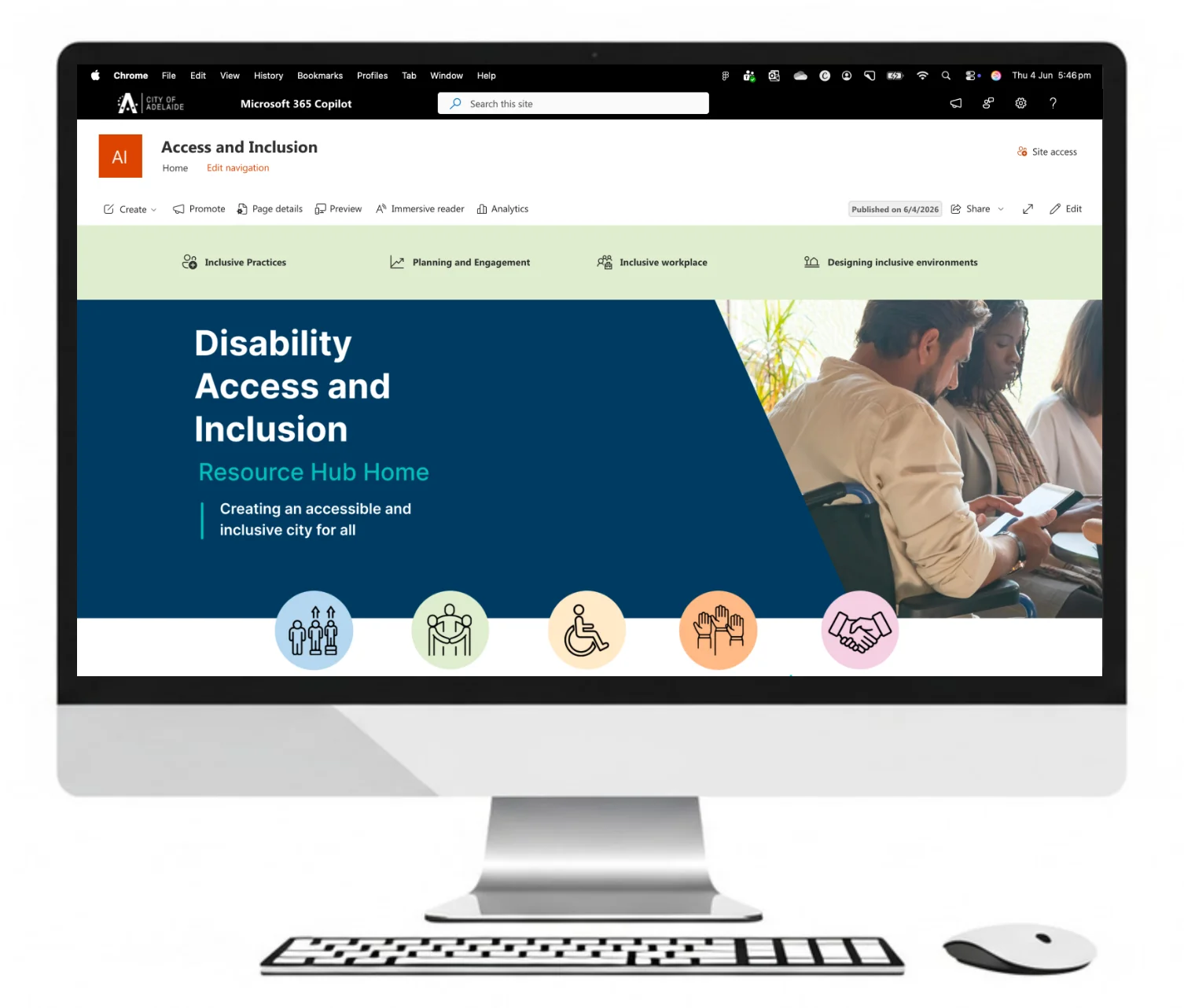
City of Adelaide Disability Access and Inclusion SharePoint learning hub on a desktop screen
Learning hub

Learning and resource hubs.

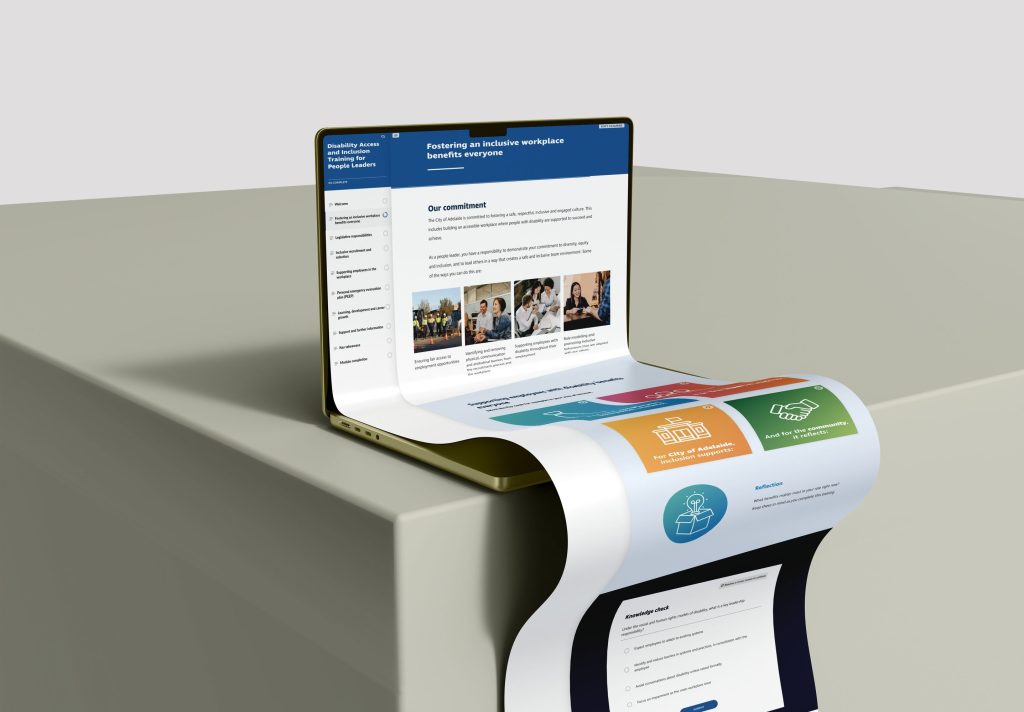
Topic pages hold the resources, policies and quick links people come back to after training, so the hub becomes their knowledge hub. City of Adelaide’s hub gives each topic its own page, from inclusive language to accessible events.

See the City of Adelaide build
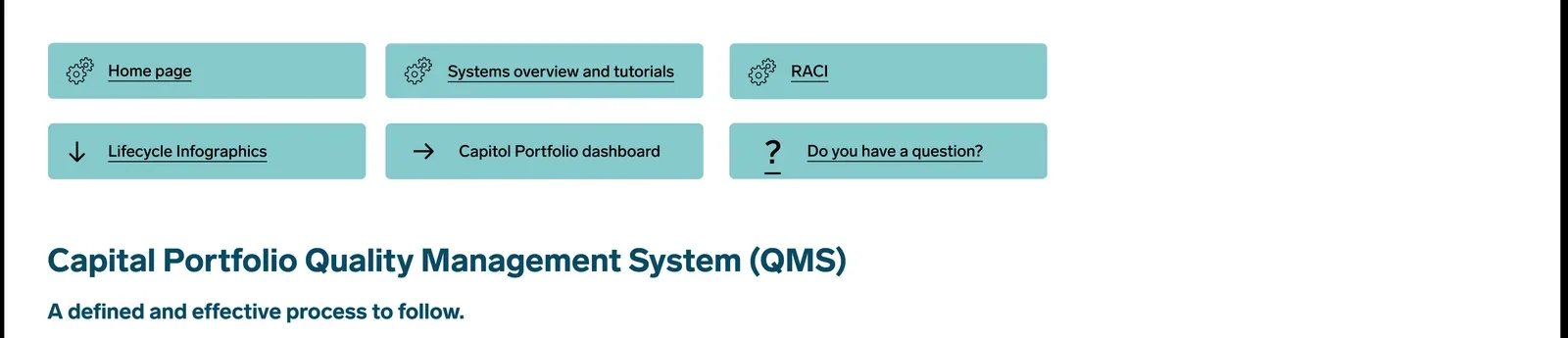
Perth Airport Capital Portfolio quality management system page in SharePoint
System hub

Process and system hubs.

One home for a new system, with the method, the life cycle, the FAQs and the resource library. Perth Airport’s Capital Portfolio QMS Hub sits at the centre of its quality rollout.

See the Perth Airport build
Horizon Power Project Management Hub pages in SharePoint
Software

Software training portals.

A training portal for the software people use every day, with tutorials and answers in one place. Horizon Power’s hub launched with a home page, Planview tutorials and a page of FAQs. Pair it with our software training eLearning.

See the Horizon Power build
An induction hub home page with a welcome banner and first-week tiles
Onboarding

SharePoint onboarding sites.

One place for everything a new starter needs over their first months, from the induction page to the first-week checklist. We built a single SharePoint home for a state corrections agency’s 49-asset induction program, so staff find the right resource when they need it.

See our onboarding work
A leader toolkit hub page with tool tiles
Leaders

Leader toolkits.

Tools, guides and conversation starters for people leaders, linked to the tracked modules in your LMS.

Ask us about a toolkit
A phone scanning a poster QR code that opens a SharePoint page
Campaign

Campaign hubs.

Every poster QR code and nudge needs somewhere to land. A hub keeps the campaign one click from people’s work.

See learning campaigns
City of Adelaide disability access and inclusion eLearning for people leaders on a desktop screen
eLearning

eLearning linked to the hub.

Each lesson links to the matching hub page, so learners finish the course knowing where to go next. City of Adelaide’s eLearning works this way.

See our eLearning
A chat panel beside a SharePoint hub page answering a staff question
AI

AI answers from your hub.

A well-structured hub gives a Copilot agent in SharePoint something good to answer from. We can set one up over your hub where your licences allow.

Read where Copilot fits

Send us a link to the SharePoint page your people use most. We’ll show you what a hub version could look like.

The difference is in the design.

HungryMinds learning design icon Flexible 768x911 1

Pages built for the moment someone gets stuck.

We start from the five moments people need help: learning something new, learning more, applying it, fixing a problem and dealing with change. Each page has a clear job in one of those moments.
Artboard 20

Answers in a few clicks.

We plan the site so each destination has one clear door from the home page, and nothing is buried in folders.
HungryMinds learning design icon VideoProduction

Built with what SharePoint does well.

We design with standard pages and web parts, so your team can run the hub without a developer. A mock-up that needs custom code soon becomes hard to maintain.
hm icon action scaled

An owner for every page.

Every page gets a named owner and a review date. Without them, pages go stale within a couple of quarters.
HungryMinds learning design icon Social

One look across course and hub.

The hub and your eLearning share the same visual design, icons and patterns. For City of Adelaide, that meant “consistent visual design and navigation across both the eLearning and SharePoint experience”.
HungryMinds learning design icon UXUI

Accessible to WCAG 2.2 AA.

We design every new hub to the Web Content Accessibility Guidelines (WCAG) 2.2 at level AA as a minimum. That means clear headings, alt text, good colour contrast and pages that work with a keyboard and a screen reader.
Our approach

From empty site to busy hub.

If you already have a site, we start by auditing what’s there and what should go. If you have a folder of files and a good idea, we start with the site map.

addie analyse

Discover

The appetiser.
addie design

Design

The recipe.
addie develop

Build

Made to order.
addie implement

Review

Taste and tweak.
addie evaluate

Launch

Serve it up.
Tools and platforms

Works with the Microsoft 365 you already have.

We design around the licences and settings in your tenant, and we tell you early if something needs an extra licence.

SharePoint pages and hub sites.

The home for your hub, with navigation, news, quick links, document libraries and embedded video.

Microsoft Teams.

Pin the hub as a tab in Teams, so people reach it from the place they chat and meet.

Viva Learning.

Viva Learning can list content from a SharePoint library beside courses from your LMS and other providers. Managers can see the reported completion status of content they recommend.

Copilot agents.

An agent in SharePoint can answer staff questions from the pages and files in your hub.

Not sure what your tenant can do?

Book a call and we’ll look at what you already have before you spend anything.

Book a call

We can add optional extras, including eLearning, training videos and job aids. We can also run a learning campaign to launch the hub, and handle LMS setup for the training you do need to track.

Give us a bell on 1300 162 393 for a no-obligation chat.
If phone calls terrify you, use our contact form.

Our team

The Goldilocks team.

Big enough to do it. Small enough to nail it.

Our learning strategists and learning designers design every SharePoint hub, and our developers build it with them. Our core team of 14 works with more than 20 consultants, so we can put together the right crew for your hub.


BiancaMichaelBecTarshNicoleOliviaTaraNaomiClaireAnthonyLaraAneetaDanielTashia
HM001 FA Character 07.Goldilocks e1710476237527
Not sure where to start?

Tell us about your hub. We’ll nut out a solution.

Jump on a quick call and we'll shape a proposal tailored to you.

FAQs

Questions, answered.

What buyers ask us about SharePoint for learning.

Ask a question
It can stand in for one when you don’t need to track completions. For guides, toolkits, onboarding and refreshers, a well-designed hub often does the job of an LMS. Our guide Can SharePoint be used as an LMS? walks through the decision.
SharePoint can’t track completions on its own. If you need records for an audit, use an LMS for the tracked course and link it to the hub. We can help you choose and set up the LMS as well as build the hub.
It often is, because Microsoft 365 organisations usually pay for SharePoint already. You still pay for the design and build, but you can avoid per-user LMS fees. If you also need tracking, a hub plus a lean LMS may cost less than a premium LMS that tries to do everything.
We give you templates for the pages you add later, built for your hub and your brand. We don’t sell an off-the-shelf SharePoint LMS template, because each learning portal needs pages named the way your people talk. Microsoft’s own training portal template is Microsoft 365 learning pathways. It has been community supported since 1 December 2025, so Microsoft support contracts no longer cover it.
A good learning site has a clear home page and a handful of topic pages named the way your people talk. Every resource sits within three or four clicks. Each page has an owner and a review date. See our work for City of Adelaide, Perth Airport and Horizon Power.

A small hub can launch in as little as 2 weeks. A hub with many topic pages, new writing or linked eLearning takes longer, and we give you a timeline with your quote.

Once the hub is live, updates are much quicker, depending on how complex they are.

Hub foundations start from $9,500 ex GST. That covers discovery, the base structure and design options. Extra pages start from $2,000 each, and we give you a fixed quote before we start.
Yes. On a retainer, we make basic changes within 24 hours and more complex changes within a few days. Your page owners can still make everyday edits themselves, using the templates we set up.

Yes, for learning. We design and build SharePoint learning hubs, training portals, onboarding sites and knowledge hubs, using standard pages and web parts your team can maintain. We work with your IT team on site set-up, permissions and governance.

For custom SharePoint development services such as migrations, workflows or code, we work alongside your IT team or development partner. We’re SharePoint consultants with team members in Melbourne, Sydney, Brisbane and Perth, and we build hubs for organisations across Australia, including Adelaide.

For a learning hub, ours cover the site map, navigation, home page and topic pages. They also cover page templates, accessibility checks and training for your page owners. Where your hub links several sites, we plan it as a hub site, which gives them shared navigation, shared branding and one home page. We start with Figma mock-ups, so you sign off the look before we build.

Yes, if your organisation has the licences. Agents in SharePoint can answer from your sites, based on what each person is allowed to see. They need a Microsoft 365 Copilot licence or pay-as-you-go billing.

The better your hub is organised, the better the answers. We can structure your hub so an agent has clean content to answer from. Read more in our guide Can SharePoint be used as an LMS? and our article on AI in learning design.

Request a quote for SharePoint learning hubs

Tell us what you need for SharePoint learning hubs and we will be in touch.

This field is for validation purposes and should be left unchanged.